


Plex: Find Movies & TV Shows
3.642.40K Reviews
App Specs
- Version
- Varies with Device
- Updated On
- License
- Free
- Downloads
- 100,000,000+
- Developer
- Plex, Inc.
- Categories
- Entertainment
- Platform
- Android, iOS
Screenshots
 Analysis by AppCompare
When I first started using Plex: Find Movies & TV Shows, the appeal was immediate: instead of opening one streaming service after another to check what was available, I could begin with a single place to search and browse. That makes it especially useful on evenings when I know I want to watch something but have no particular title in mind. Plex is a free entertainment app from Plex, Inc., and its core value is helping me explore viewing options without turning the choice itself into a long chore. I would treat it as a discovery companion, though, rather than assuming it replaces the services where I already watch shows.
The first-week appeal: less searching, more choosing
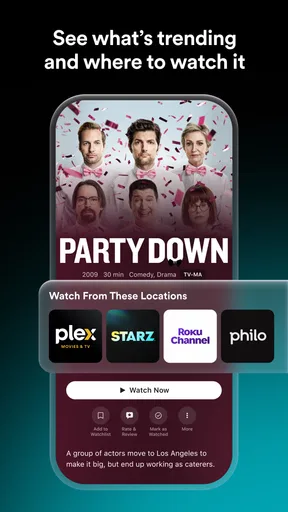
During the first few days, I found Plex most helpful when I had a loose idea rather than a fixed plan. I could browse by mood or interest, save something for later, and use the app to get a clearer sense of where a title might be watched. That small change in routine matters: instead of repeating the same searches across multiple apps, I could start with a broader view and narrow things down. It is a practical convenience, not a promise that every title will be available to watch in the same place or under the same conditions.
A realistic example is the familiar after-dinner negotiation: one person wants a comedy, another wants a thriller, and nobody wants to spend half the evening browsing. I would use Plex to collect a few candidates before everyone settles in, then check the viewing option for the one the group chooses. The app is most valuable in that moment when it turns vague preferences into a manageable shortlist. If everyone already knows the exact film and the service they want to use, going straight to that service may be quicker.
Discovering New Content
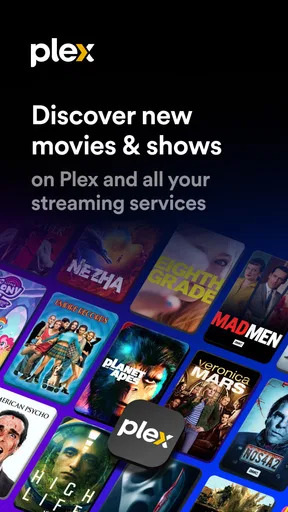
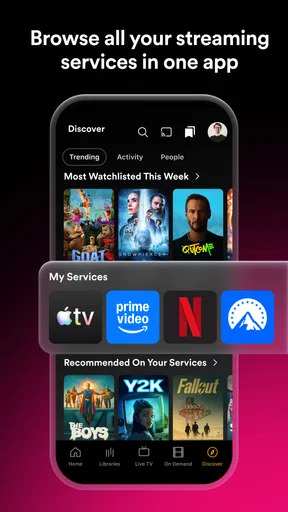
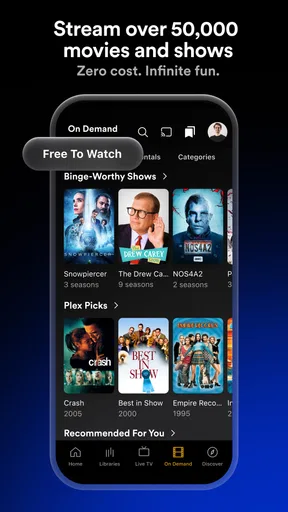
One of the coolest features of the Plex app is its ability to help you discover new movies and TV shows. You know that feeling when you’re scrolling endlessly through streaming services and just can’t find anything to watch? Yeah, that’s where Plex comes in. It aggregates content from various platforms, so you have a one-stop-shop for browsing. The interface is intuitive, letting you filter by genre, release year, and even IMDb ratings. It’s like having a personal assistant who knows your taste in entertainment.
Recommendations work best as a starting point
I like recommendations more when I treat them as prompts than when I expect them to know me perfectly. A suggested title can be a useful nudge toward a genre or actor I had not thought about, but I still check the details before committing to it. If I passively accept every recommendation, the browsing experience can start to feel like another feed to clear. A better habit is to use a suggestion to branch into a quick search: if a film catches my eye, I look for related titles, compare the options, and save only the ones I can realistically imagine watching.
Personalized Recommendations
What I really love about Plex is its personalized recommendation system. It takes note of what you’ve watched and liked, then suggests similar content. It’s like it reads your mind! I found myself watching shows I never would have discovered otherwise. Plus, the more you use it, the better it gets at curating suggestions. It’s pretty spot-on most of the time.
That personalization is useful, but it is also a reason to keep your expectations sensible. Recommendations are only as helpful as the signals behind them, and my mood does not always match my recent viewing. If the home screen starts leaning too heavily toward one kind of show, I would switch from browsing recommendations to searching by a different genre or a specific name. That keeps discovery active rather than letting the same pattern dictate every choice. For a household with several viewers, it is also worth remembering that one person’s habits may not represent everyone’s taste.
Worth Reading Before You Choose

Switching to Android Auto Means Rethinking Your Driving Routine

Google Calendar Makes a Crowded Week Easier to Manage

Baby Panda World Brings Quick Play to Modern Phones, but Its Game Library Feels Busy

ESPN’s Live Game View Makes Following Close Games Easier

QuizzLand Review: A Good Fit for Short Trivia Breaks, Not Every Player

Basketball Stars: Multiplayer Is Fast, but Can It Recover When Matches Go Wrong?
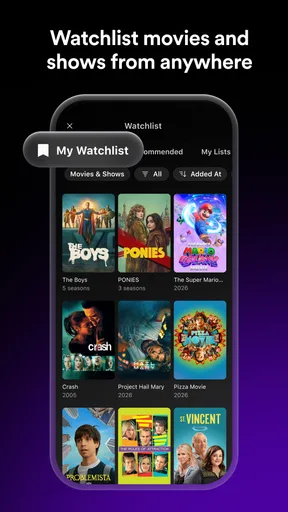
A watchlist that earns its place
The most durable use I found for a watchlist is not saving every interesting title; it is using it as a small, deliberate queue. When I see something I might watch later, I can add it instead of trying to remember its name or leaving yet another tab open. I would review the list occasionally and remove titles that no longer appeal. That simple upkeep prevents a watchlist from becoming an unhelpful archive, and it makes the app more useful when I actually have time to choose.
Watchlist and Alerts
Another neat feature is the watchlist. You can easily add titles you’re interested in and get alerts when they become available. This is super handy if you’re waiting for a new season or a movie to drop. I’ve set up alerts for a bunch of shows, and it’s always exciting to get a notification that something’s ready to watch.
For an alert to be genuinely useful, I would save titles I care about and allow only the notifications that help me act. If I track too many things, each alert becomes less noticeable, and the phone starts feeling busier rather than more helpful. Availability can also change the practical value of a saved title: when a notification arrives, I still need to check whether the viewing option works for me. Plex can reduce the effort of keeping an eye on titles, but it cannot make every option equally convenient.
Comparing it with streaming apps and search
The usual alternative is to browse directly inside each streaming app. That can be better when I already subscribe to one service and want to see its complete catalogue, account-specific options, or its own recommendations. Plex serves a different role: it gives me a broader starting point when I do not know where to look. A general web search can answer a quick question about one title, but it is less appealing when I want to explore several possibilities, keep a watchlist, or return to a discovery habit later.
I would not use Plex as a guarantee that a title is free to watch just because the app itself costs nothing. The app has a free price, while in-app purchases are listed from $0.99 to $324.99 per item; those are separate considerations from the viewing choices I encounter. The useful question is not simply whether Plex is free, but whether the way I plan to watch a particular title fits my subscriptions, preferences, and budget. I check the available option before I build an evening around it.
What the interface does well—and where friction remains
Using Plex is a breeze. The design is sleek, and it’s really easy to navigate. Whether you’re a tech guru or not-so-savvy with apps, you’ll find Plex user-friendly. The search function is fast and accurate, saving you from endless scrolling. Plus, it syncs across devices, so you can pick up right where you left off, whether you're on your phone, tablet, or TV.
For me, the cross-device benefit is most noticeable when I use the phone for discovery but prefer to watch on a larger screen. I can make a shortlist while I have a spare moment, then continue from another device instead of repeating the search. That is a better use of mobile than trying to make every viewing decision on a small screen. The trade-off is that a smooth handoff does not remove the need to check the destination device and the actual viewing option; browsing and watching are related tasks, but they are not always the same step.
Who will keep using it after the novelty fades?
Plex is a strong fit for people who routinely forget titles they meant to watch, compare options across services, or enjoy discovering something without starting from a single subscription’s home screen. It can also suit couples or families who want to gather a few possible choices before deciding together. The app is less compelling for someone who watches only one service, always knows what they want, or dislikes maintaining a separate list. In those cases, the service they already use may cover the same everyday need with fewer steps.
There is also a difference between using Plex as a regular planning tool and installing it just to browse once. The first habit can make the app more valuable over time: save a handful of realistic options, check availability when plans change, and return when you are ready to watch. The second may not last if your existing apps already make discovery easy. I would give it a fair trial around a real viewing routine rather than judge it by how many titles I can scroll past in one sitting.
Maintenance without turning entertainment into homework
The upkeep is light, but not nonexistent. A useful watchlist needs occasional pruning, recommendations benefit from deliberate browsing rather than endless passive scrolling, and alerts should be limited to titles I genuinely care about. I would not try to catalogue every film I have heard of; that turns a handy reminder into another task. A small list of likely picks is easier to use when I have ten minutes to decide what to watch.
One practical approach is to add titles only when I can say why I saved them: a particular mood, a person I want to watch with, or a gap in my usual choices. Later, I can remove anything that no longer fits. This makes Plex less like a second streaming library to manage and more like a flexible bridge between discovery and the apps where I watch. If I find myself ignoring the list for weeks, that is a useful sign to simplify it rather than keep adding to it.
Ratings, audience, and the kind of commitment it asks for
The app has an average rating of 3.7 from around 473,000 ratings, with roughly 42,000 written reviews, and it has passed 50 million installs. I read those figures as evidence of a widely used app with mixed experiences, not as a guarantee that every part of it will suit me. It is rated Teen, so I would keep that in mind when deciding whether it is appropriate for younger viewers. For my own decision, the more important test is whether its discovery and tracking tools solve a recurring problem in my household.
Because Plex is free to install, trying it does not require paying an entry price, but the app’s wider purchase options are worth noticing before making any spending decisions. I would start by using its basic discovery routine and see whether I return to it naturally. If the app helps me find something faster or remember a title I would otherwise lose, it has earned a place. If it adds another layer between me and the show I already want, I would remove it without feeling that I missed an essential streaming service.
Cross-Platform Compatibility
Oh, and did I mention that Plex is available on both Android and iOS? It doesn’t matter what device you’re using; Plex has got you covered. I tried it on my phone and tablet, and the experience was seamless across both platforms. It’s perfect for when you’re on the go or lounging at home.
Final Thoughts
Overall, Plex: Find Movies & TV Shows is a must-have app for any movie or TV buff. It simplifies the whole process of finding something to watch and keeps you updated on your favorite shows. If you’re like me and tired of aimlessly browsing through endless options, give Plex a try. It’s like having a personal entertainment concierge at your fingertips. Happy streaming!
Pros
- Extensive library of content.
- User-friendly interface.
- Supports multiple devices.
- Offline viewing available.
- Customizable media server.
Cons
- Requires internet for streaming.
- Some content needs subscription.
- Ads in free version.
- Limited content in certain regions.
- Occasional buffering issues.
FAQs for Plex: Find Movies & TV Shows
What is Plex and how does it work?
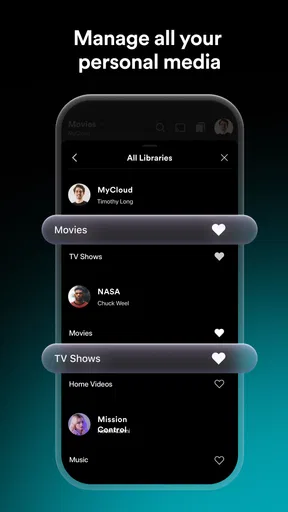
Plex is a streaming app that allows users to find and watch movies and TV shows from various sources. It organizes all your personal media and streams it to your devices. The app also offers access to free, on-demand movies and TV, live TV, and Plex's own curated content, all in one place.
Is Plex free to use, or are there any subscription costs?
Plex offers a free tier that provides access to basic features, such as streaming your own media and watching ad-supported content. For additional features like mobile sync, offline viewing, and enhanced music libraries, Plex offers a premium subscription called Plex Pass, which is available for a monthly, annual, or lifetime fee.
Can I use Plex to watch live TV, and if so, what do I need?
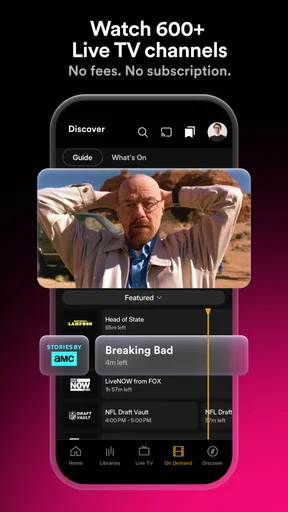
Yes, Plex allows you to watch and record live TV. To access live TV, you’ll need a compatible TV tuner and an antenna connected to your Plex server. Plex Pass subscribers can also use the app's Electronic Program Guide (EPG) to browse and manage live TV content more easily.
How does Plex handle content from different regions?
Plex offers content from various regions, but availability may vary based on licensing agreements. Users can access their personal media from anywhere, but for on-demand and live TV content, certain shows or movies might be restricted or unavailable in specific regions. VPNs may be used to access region-locked content, though this can violate Plex's terms of service.
What devices are compatible with Plex?
Plex is compatible with a wide range of devices, including smartphones, tablets, smart TVs, streaming devices like Roku, Apple TV, and Amazon Fire TV, as well as gaming consoles like PlayStation and Xbox. It also runs on major operating systems like Windows, macOS, Linux, and more, making it highly versatile for various user setups.


